
Formatting Your Paper
The default formatting rules for all written work at EBS — homework, reports, and theses.
These rules apply unless your lecturer or supervisor gives different instructions for a specific assignment.
What every paper needs
- Papers shorter than five pages (e.g., homework, reports): title page, page numbers, body text, reference list, and an author’s note on AI usage, unless your instructor says otherwise.
- Papers longer than five pages, divided into chapters: add a table of contents.
- Any paper may also include tables, figures, and appendices, if relevant.
- Always use the EBS PowerPoint template when presenting homework or research results, in or outside EBS.
Title page
Required elements, in order: 1) name of the university; 2) programme name, or course name and number (e.g., International Business Administration, or IntBBA); 3) title of the paper; 4) author name(s), in order of authorship; 5) lecturer’s or supervisor’s name; 6) submission date (year, or year and place).
Center all text on the title page. Keep the title focused, concise, and free of unnecessary words — it should summarize the paper’s core idea in an engaging way. Download a title page template on the Templates & Samples page.
Margins
2.54 cm on all sides (top, bottom, left, right) — the default “Normal” margin in Word (Layout → Margins → Normal). Start a new heading on a new page if two lines or fewer of the previous section would otherwise be left dangling at the bottom of a page.
Paragraph alignment
Justify the text (Word: Home → Paragraph → Justify) so both margins are even. Don’t hyphenate words manually at line breaks, and don’t manually break long DOIs or URLs onto a new line.
Paragraph indentation
Indent the first line of every paragraph 1.27 cm, using the automatic setting: Format → Paragraph → Indentation → Special → First line → 1.27 cm. Don’t fake this with the Tab key or spaces.
Headings
The number of heading levels depends on the paper’s length and complexity — most papers use three. Number headings with Arabic numerals, except the Introduction, Conclusion, and Reference List, which are never numbered.
| Level | Format |
|---|---|
| 1 | Centered, bold, Title Case, Times New Roman 16. Starts a new page, 5 cm from the top; first-line indent 0 cm. |
| 2 | Flush left, bold, Title Case, Times New Roman 14. Starts a new paragraph. |
| 3 | Flush left, bold italic, Title Case, Times New Roman 14. Starts a new paragraph. |
| 4 | Indented, bold, Title Case, ends with a period, Times New Roman 12. Text continues on the same line. |
| 5 | Indented, bold italic, Title Case, ends with a period, Times New Roman 12. Text continues on the same line. |
Section labels (e.g., “Author Note,” “Abstract,” “Appendix A”) go on their own line, bold and centered, at the top of the section.
Fonts and spacing
| Element | Font | Spacing |
|---|---|---|
| Body text | Times New Roman 12 | 1.5 line spacing; 0 pt before/after |
| Table of contents | Times New Roman 12 | 1.5 |
| Footnotes, tables, figures | Times New Roman 10 | Single (1.0) |
| Reference list (text) | Times New Roman 12 | 1.5; hanging indent 1.27 cm |
Use bold for emphasis. Use italics for foreign-language words, equations, and symbols.
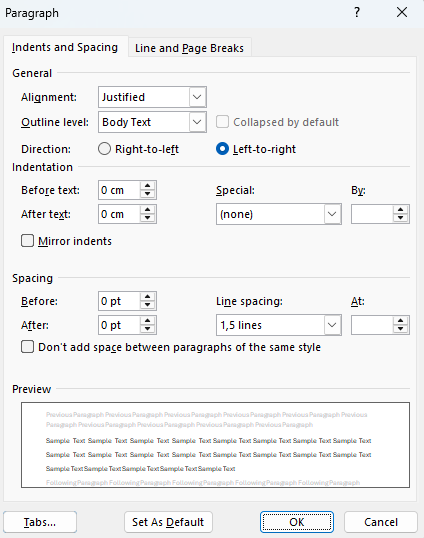
Figure 1 shows the correct paragraph settings for body text: 1.5 line spacing with 0 pt spacing before and after. The same settings apply when a heading of any level sits between two paragraphs of body text — do not add extra space above or below the heading.
Figure 1
The Line Spacing Options function. Screenshot from the WORD Program
Quotations
Paraphrase rather than quote directly wherever possible — it fits your own writing style and argument better. Use direct quotes mainly to present findings from qualitative interviews.
Short quotes (under 40 words): quotation marks, worked into your sentence, no extra formatting.
Block quotes (40 words or more): no quotation marks; start on a new line, hanging-indent the whole block 1.27 cm from the left margin, 1.5 line spacing, no extra space before or after.
Don’t add an ellipsis at the start or end of a quote unless the original source has one. Always include the page number.
Page numbers
Numbering starts on the title page, but the title page itself shows no number. Page 2 — the “verso” page — is the first page to display a number. Numbers are Times New Roman 12, top of the page, right-aligned.
Equations and symbols
Times New Roman 12, italic, 1.5 line spacing. Number equations consecutively with Arabic numerals in parentheses when referring to them in the text.
Tables and figures
Every table and figure needs a number, a title, headings, a body, and a source note (e.g., “Composed by the author based on…”) — all above the table or figure. Number tables and figures consecutively (Arabic numerals) throughout the paper. Use Times New Roman 12, 1,5 spacing, left-aligned, for headings of the number and the title.
Tables over half a page go in an appendix; tables over one A4 page continue on the next page or move to an appendix (repeat row/column headers if continued). Landscape orientation is fine if needed. All table and figure content must be in the language of the paper. Color is allowed, but any information conveyed by color must still be distinguishable in black and white.